What is the Design Plan Stage?
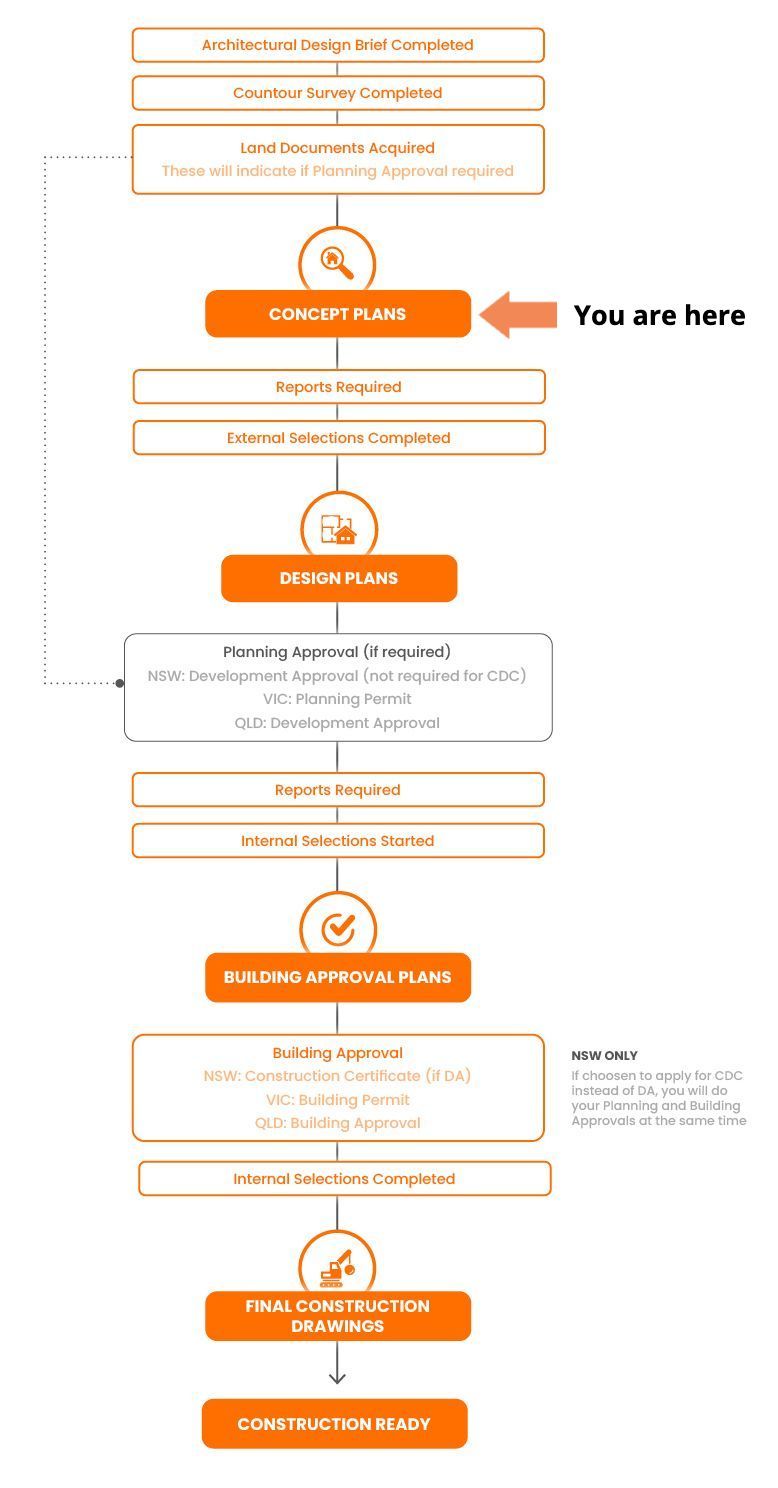
The Design Plans phase is where your concept is developed into a fully resolved set of drawings, ready for Planning Approval. If your project does not require Planning Approval, you still require this set of plans to engage your next Pros, which will help you produce documentation for your Building Approval.
These plans go beyond layout and appearance — they include the technical details needed for council or certifier submission and begin forming the documents your consultants will use.
At this stage, your Building Designer will prepare more advanced drawings that reflect feedback from you, any site constraints, and approval requirements.
What Does a Building Designer Do?
Your Building Designer will complete works according to your agreed scope of works.
Typically, a Building Designer will:
- Develop your Concept Plans into detailed design documentation
- Update plans to meet CDC or DA rules (setbacks, height limits, shadow diagrams, etc.) (NSWW only)
- Coordinate with consultants (e.g. BASIX, bushfire, engineering)
- Respond to your feedback and refine the drawings
- Ensure everything is ready for approval submission
This is a hands-on stage — your input and timely responses to questions (RFIs) are crucial.
A good building designer must produce documents based on best practices. Click the button to download Build Buddy's Building Design and Documentation Standards.
Before You Begin: What You'll Need Ready
To manage your Design Plans effectively, you’ll need:
- Signed agreement or continued engagement with your Building Designer
- Finalised Concept Plans approved by you
- Site-specific consultant inputs (e.g. bushfire, flood, BASIX)
- Clear understanding of:
- Payment milestones and invoicing
- Revision limits
- Estimated timeline for submission readiness
Keep your Build Buddy Design Checklist on hand to review before final approval.
Tip: Stay Organised and Communicate Often
Keep a shared folder or email thread with your designer — it helps track progress and decisions.
Set weekly check-ins or agreed communication points to avoid delays and last-minute surprises.
Make notes when reviewing drafts: don’t just react to the overall look — think about room sizes, flow, and storage.
Frequently Asked Questions
What’s the difference between Concept Plans and Design Plans?
Concept Plans are rough drafts that establish layout and direction. Design Plans are more technical and ready for submission to council or a certifier.
Can I still make changes at this stage?
Yes, but major changes may affect the timeline and cost. Stick to minor adjustments where possible and consolidate your feedback to avoid multiple rounds.
What’s an RFI?
RFI stands for Request for Information. If your designer needs clarity on something (e.g. ceiling height, material choice), they’ll send an RFI to you. Answer these promptly to avoid delays.
NEED HELP?
Reach Out to Your Build Buddy Pro
If you have any questions or need a hand, your Build Buddy Pro is your best first contact. They’re a licensed expert in their field and can understand the ins and outs of your project. You can message them via the platform, or you can call them directly.
If you have already contacted your Build Buddy Pro and still need further assistance, the Build Buddy Expert Guidance and Support team are here to help. They will be able to guide you on your next steps or help you find answers to any questions you may have.