What is a What is an Onsite Detention (OSD) System Installer?
An Onsite Detention System Installer is a specialist who supplies and installs stormwater detention tanks, pits, pipes, and flow control devices on your property. An OSD system temporarily holds back stormwater runoff during heavy rains, releasing it slowly to prevent downstream flooding — a common council requirement for new builds or major extensions.
This work happens toward the end of external civil works, often coordinated around driveway construction or landscaping.
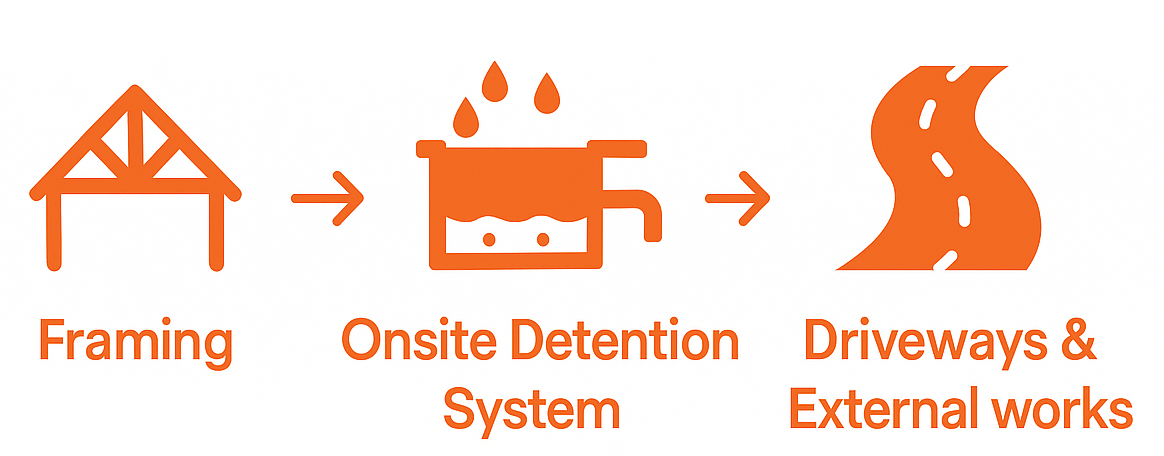
What does an Onsite Detention System Installer do?
Your contractor will complete works according to your agreed scope of works.
Typically, they will:
- Review the OSD engineering plans and council requirements
- Supply the detention tanks, or construct in-situ concrete tanks if specified
- Install inlet/outlet pipes, grates, pits, and orifice plates
- Coordinate with your plumber or builder for stormwater connections
- Ensure the system is compliant with council-approved plans
Some installers also handle certification and inspections for final approvals.
Barry's Toolbox
Get your OSD system engineered and approved early — some councils won't issue your Occupation Certificate (OC) without the detention system inspected and signed off.
And remember, OSD tanks often sit
under driveways, lawns, or gardens — so sequence installs carefully to avoid breaking up new concrete!
What to look for in an OSD Installer
When reviewing quotes, look for:
- Full scope: excavation, tank supply, pipework, fittings, and reinstatement
- Experience working with your council’s OSD requirements
- Clear inclusion of certification or sign-off (if required)
- Site access and spoil removal plan (excavated soil must be removed)
- Warranty on tanks, pits, and installation works
It’s a big bonus if they coordinate final inspections directly with your certifier.
Before You Begin: What You’ll Need Ready
To get quotes from Onsite Detention System Installers, you’ll need:
- Approved OSD engineering drawings and stormwater plans
- Site levels and driveway setout if relevant
- Timing of driveway or landscaping works
- Site access instructions (especially if excavators or cranes are needed)
- Target install date (linked to external works program)
Average Timeframe
For this task, Pros typically provide quotes within
7-10 business days.
When Can I Expect Quotes?
Timeframes often vary based on demand and the type of Pro you're engaging (e.g. a plumber). If additional communication or clarification is needed is needed, the quoting process may take longer.
Don't be alarmed if you don't receive quotes or communication from any Build Buddy Pros straight away. Some work is more complex and the Pro may need time to comprehend your documents or scope of work. Depending on the job, there may even be some work required by the Pro before they are able to quote (e.g. a site visit might be required).
If the average timeframe indicated here has passed, and you have not received any messages or quotes, please feel free to contact the Build Buddy Expert Guidance and Support team for an update on quoting for this task.
Frequently Asked Questions
Do I always need an OSD system?
Only if your council’s conditions require it. New homes or large extensions often trigger the need for OSD.
Can my plumber install the OSD system?
Sometimes — but complex tanks or strict council conditions are better handled by an OSD specialist.
Where is the OSD tank usually located?
Often under the driveway, lawn, or side yard. Location depends on site slope, access, and council requirements.
How to Complete this Task?

STEP 1
Review and Adjust the Scope of Works
Timeframes may vary based on demand and the type of Pro you're engaging (e.g., a plumber). If additional communication or clarification is needed, the quoting process may take longer.

STEP 2
Confirm Required Documents Are Uploaded
Check that the following required document(s) are uploaded for this task. These are essential to proceed:

STEP 3
Update the Quality Assurance Checklist
Go to the
Quality Assurance tab in this task and review the checklist. Edit any details to suit your project requirements. Being clear and upfront helps set expectations with the Pro. Updating the checklist before requesting quotes ensures everyone is aligned.

STEP 4
Request Quotes
Click the
orange ‘Request Quotes’ button to start the quoting process.

STEP 5
Review the Quotes
Once you receive quotes:
- Review each one carefully, including the payment schedule and any special terms
- Download attached quote documents for detailed review
- Check each Pro’s profile and read past client reviews

STEP 6
Communicate with the Pro
If needed, message or call the Pro to clarify details or negotiate terms.

STEP 7
Accept a Quote
Choose the quote that best suits your needs. Once you accept a quote, any other pending quotes will be automatically declined. An agreement will automatically be generated.

STEP 8
Complete the Tasks In Your App
New tasks will appear to guide you through this job — follow each step carefully. Make sure to use the
Quality Assurance Checklist, and refer to your
contract and
final Scope of Works whenever needed.
NEED HELP?
Reach Out to Your Build Buddy Pro
If you have any questions or need a hand, your Build Buddy Pro is your best first contact. They’re a licensed expert in their field and can understand the ins and outs of your project. You can message them via the platform, or you can call them directly.
If you have already contacted your Build Buddy Pro and still need further assistance, the Build Buddy Expert Guidance and Support team are here to help. They will be able to guide you on your next steps or help you find answers to any questions you may have.