What Are Design Plans (Off-Platform Designer)?
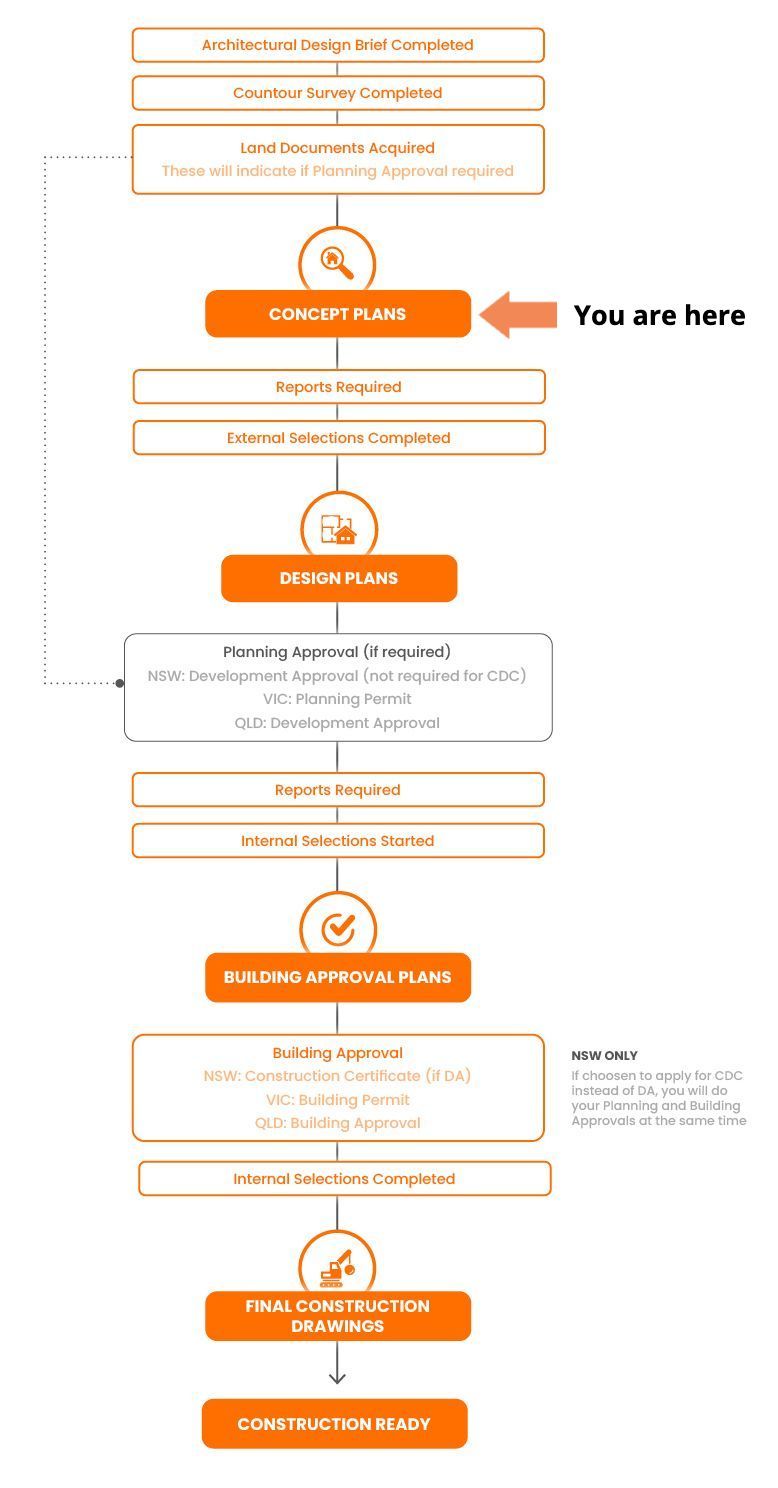
Design Plans are the detailed development of your approved Concept Plans. These drawings are more technical and refined. They include site setbacks, floor levels, elevations, roof form, and any compliance updates required for approval.
If you're working with an off-platform Building Designer, it’s essential to ensure that your plans meet Build Buddy Design Guidelines so they remain compatible with Build Buddy tools and services throughout the rest of your project.
What Does a Building Designer Do?
Your Building Designer will complete works according to your agreed scope of works.
Typically, a Building Designer will:
- Evolve your Concept Plans into approval-ready documentation
- Add site-specific details (e.g. levels, setbacks, orientation)
- Coordinate with required consultants (e.g. BASIX, engineering, bushfire)
- Update drawings based on planning controls and approvals strategy
Provide you with a detailed PDF set of plans, often including shadows, area schedules, and elevations.
A good building designer must produce documents based on best practices. Click the button to download Build Buddy's Building Design and Documentation Standards.
Before You Begin: What You'll Need Ready
To complete your Design Plans, make sure you have:
- Finalised and approved Concept Plans
- Feedback from your chosen certifier or planning advisor (if available)
- Site-specific documents (surveys, bushfire or flood overlays, estate guidelines)
- Clear understanding of the Design Plan checklist and what’s needed for your chosen approval pathway
When your plans are complete, review them against:
- The Build Buddy Design Plan Checklist
- The Build Buddy Design Guidelines (available in your dashboard)
Tip: Stick to the Guidelines — They’ll Save You Time Later
Use the Build Buddy Design Plan Quality Checklist to confirm your designer has included everything required.
Ask your designer to explain what’s changed since the Concept Plan — don’t assume it’s all correct.
If your design doesn’t follow the Build Buddy Design Guidelines, you may run into quoting or compliance issues later on.
Store all plans and documents in a shared folder — Build Buddy consultants can’t assist unless your files are organised and accessible.
Frequently Asked Questions
Why does it matter if my designer is off-platform?
Off-platform designers may not follow the same formats or compliance checks. You’re responsible for ensuring the work aligns with Build Buddy systems and approval pathways.
What if my designer misses something?
You’ll need to request a revision. That’s why using the Design Plan Quality Checklist early helps avoid rework and delays.
What’s the difference between Concept Plans and Design Plans?
Concept Plans show the overall layout. Design Plans add the technical and compliance detail needed for submission and construction preparation.
NEED HELP?
Reach Out to Your Build Buddy Pro
If you have any questions or need a hand, your Build Buddy Pro is your best first contact. They’re a licensed expert in their field and can understand the ins and outs of your project. You can message them via the platform, or you can call them directly.
If you have already contacted your Build Buddy Pro and still need further assistance, the Build Buddy Expert Guidance and Support team are here to help. They will be able to guide you on your next steps or help you find answers to any questions you may have.