What Is a Town Planner?
A Town Planner is a specialist in land use and local government regulations. They help you understand what you’re allowed to build on your block, and how to get it approved.
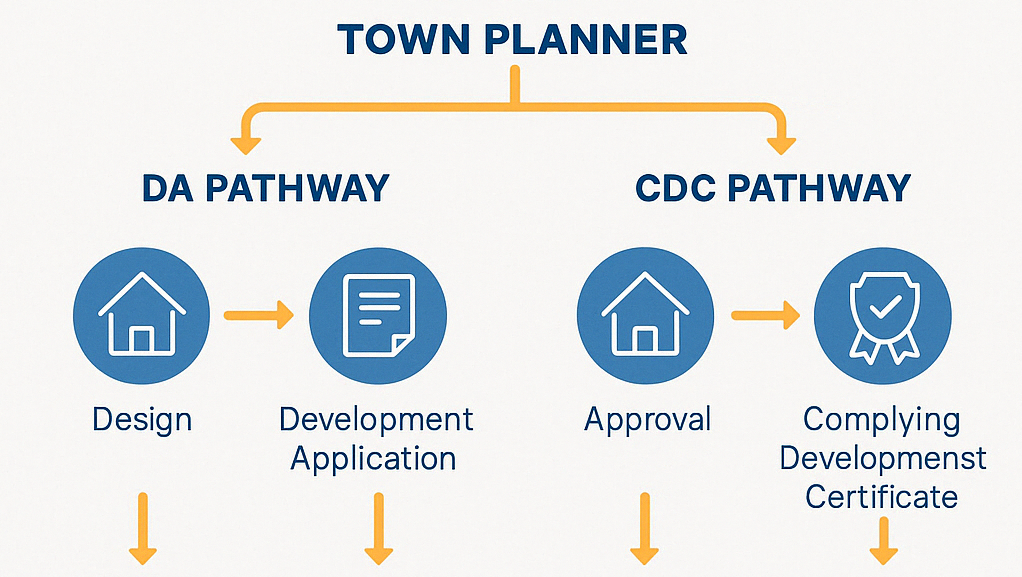
If you’re submitting a Development Application (DA), the Town Planner prepares the key documents — like the Statement of Environmental Effects (SOEE) — that explain to council how your home complies with planning laws.
They’re often your first point of contact when preparing to build under the
DA pathway, and can advise whether your project could qualify for
Complying Development (CDC) instead.
What does a Town Planner do?
Your Town Planner will complete works according to your agreed scope of works.
Typically, a Town Planner will:
- Review your site conditions, zoning, and concept plans
- Confirm whether your build should go through a DA or CDC pathway
- Identify any special planning issues (e.g. bushfire risk, flooding, heritage)
- Prepare a Statement of Environmental Effects (SOEE) — required for DA submission
- Coordinate or submit your DA or CDC through the NSW Planning Portal
- Liaise with council and respond to Requests for Information (RFIs)
- Review your final Notice of Determination and help you understand the Conditions of Consent
Barry's Toolbox
Check local council experience. A planner who knows your council’s quirks will navigate the system faster and with fewer surprises.
What to Look For in a Town Planner
You’re looking for someone who:
- Has recent experience with residential projects in your local council area
- Can confidently handle DA and CDC paths, not just one or the other
- Offers a complete service — from review to lodgement and council follow-up
- Can recommend ways to simplify your design or reduce approval risks
- Understands how to write and justify a high-quality SOEE
- Is responsive and clear about timelines — approvals take time and communication is key
Before You Begin: What You’ll Need Ready
To get quotes from Town Planners for your Planning Assessment or SOEE, you’ll need:
- Your concept or architectural drawings
- Site details and address
- Your proposed build scope (e.g. dual occupancy, secondary dwelling)
- Any supporting assessments you already have (e.g. bushfire, arborist, environmental reports)
- Clarify your desired outcome (DA, CDC, or both)
Average Timeframe
For this task, Pros typically provide quotes within
3–5 business days.
When Can I Expect Quotes?
Timeframes often vary based on demand and the type of Pro you're engaging (e.g. a plumber). If additional communication or clarification is needed is needed, the quoting process may take longer.
Don't be alarmed if you don't receive quotes or communication from any Build Buddy Pros straight away. Some work is more complex and the Pro may need time to comprehend your documents or scope of work. Depending on the job, there may even be some work required by the Pro before they are able to quote (e.g. a site visit might be required).
If the average timeframe indicated here has passed, and you have not received any messages or quotes, please feel free to contact the Build Buddy Expert Guidance and Support team for an update on quoting for this task.
Frequently Asked Questions
Do I need a Town Planner if I’m going through CDC instead of DA?
Possibly — a Town Planner can still help confirm that your design meets the Complying Development Code and flag any risks. They’re especially useful if you’re unsure which path to take or need help preparing the right documentation.
Do I need to have all my selections finalised?
Not necessarily. If you’re still deciding on fixtures or finishes, your Estimator can include provisional allowances based on average costs. You can update these later once selections are locked in.
How to Complete this Task?

STEP 1
Review and Adjust the Scope of Works
Timeframes may vary based on demand and the type of Pro you're engaging (e.g., a plumber). If additional communication or clarification is needed, the quoting process may take longer.
STEP 2
Confirm Required Documents Are Uploaded
Check that the following required document(s) are uploaded for this task. These are essential to proceed:

STEP 3
Update the Quality Assurance Checklist
Go to the
Quality Assurance tab in this task and review the checklist. Edit any details to suit your project requirements. Being clear and upfront helps set expectations with the Pro. Updating the checklist before requesting quotes ensures everyone is aligned.

STEP 4
Request Quotes
Click the
orange ‘Request Quotes’ button
to start the quoting process.

STEP 5
Review the Quotes
Once you receive quotes:
- Review each one carefully, including the payment schedule and any special terms
- Download attached quote documents for detailed review
- Check each Pro’s profile and read past client reviews

STEP 6
Communicate with the Pro
If needed, message or call the Pro to clarify details or negotiate terms.
STEP 7
Accept a Quote
Choose the quote that best suits your needs. Once you accept a quote, any other pending quotes will be automatically declined. An agreement will automatically be generated.
STEP 8
Complete the Tasks In Your App
New tasks will appear to guide you through this job — follow each step carefully. Make sure to use the
Quality Assurance Checklist, and refer to your
contract and
final Scope of Works whenever needed.
NEED HELP?
Reach Out to Your Build Buddy Pro
If you have any questions or need a hand, your Build Buddy Pro is your best first contact. They’re a licensed expert in their field and can understand the ins and outs of your project. You can message them via the platform, or you can call them directly.
If you have already contacted your Build Buddy Pro and still need further assistance, the Build Buddy Expert Guidance and Support team are here to help. They will be able to guide you on your next steps or help you find answers to any questions you may have.